Quick Answer
Scan or photograph the old print, record the message as an audio file, and give both to a lip sync tool: it renders a short video in which the face in the photo speaks the message. This guide is only for a photo of yourself when you were younger, or a photo of a living relative who has agreed to it. Percify's terms do not allow making a talking video of a person without their explicit consent, or impersonating anyone, so a photo of someone who cannot agree is outside what you can make here.
Scan the old photo, record or type the message, and a lip sync tool renders the face speaking it. Only for your own old photo or a living relative who agrees. Steps on Percify and how HeyGen, Hedra, D-ID and two open models compare, checked 19 November 2026.
Keep reading
Related next steps
Scan or photograph the old print, record the message as an audio file, and give both to a lip sync tool: it renders a short video in which the face in the photo speaks the message. This guide is only for a photo of yourself when you were younger, or a photo of a living relative who has agreed to it. Percify's terms do not allow making a talking video of a person without their explicit consent, or impersonating anyone, so a photo of someone who cannot agree is outside what you can make here.
Every limit and price below was read on the maker's own page on 19 November 2026. Percify is a paid product: making videos needs a plan.
Before you start: whose photo, whose words
- Your own old photo. You at 8, at 20, on your wedding day. You are the person in the picture and you agree.
- A living relative who says yes. Ask first, show them what the result looks like, and let them hear the message. A grandparent recording their own message for the family is the best version of this: their photo, their voice, their words.
- Not without consent. If the person in the photo cannot agree, or has not, do not make it.
- Say what it is when you share it. Tell the family the video was generated from a still photo. It is a keepsake, and it is not a recording of that day.
Step 1: get the old photo into good shape
Old prints are small, faded and often creased. The lip sync model needs to find the face and the mouth.
- Scan it or photograph it flat, in even daylight, with no glare on the print and no fingers in the frame.
- Crop to one face. Head and shoulders, the face looking roughly at the camera. Cut a group photo down to the one person who agreed.
- Check the mouth. It should be visible and closed or nearly closed. A hand, a cigarette, a veil or deep shadow over the lips gives poor results.
- Small and blurry is a limit. If the face is only a few millimetres wide on the print, the result will be soft. Pick the sharpest photo you have.
Step 2: record the message
- The person in the photo records it themselves where possible, on a phone, in a quiet room.
- Speech only, no music under it. Keep a first test to 5 to 10 seconds.
- Save it as a common audio file. We used an MP3 for the example on this page.
- The video will be exactly as long as the recording.
Step 3: put the two together on Percify
- Open InfiniteTalk Fast ↗. The form is visible before you sign in. Making videos needs a plan.
- Add the scanned photo in the Image field.
- Add the recording in the Audio field.
- Run the model. It bills per second of your audio.
- Download the MP4 and share it with the family.
What it costs. On 19 November 2026 the pricing page showed four plans: Starter at $12 a month, Creator at $26 a month, Scale at $65 a month and Ultra at $128 a month. The same page puts a 15 second talking video at about 30 credits, and Creator at 1,233 credits a month. No plan puts a watermark (except Remake replicas, which carry a small AI-disclosure mark) on the video.
Worked example: an old print, a short message, one clip
This is a real run on Percify. The portrait and the voice are AI generated, made to look and sound like an old print and a recorded message, so no real person appears on this page. With your own photo and your own recording the steps are the same.
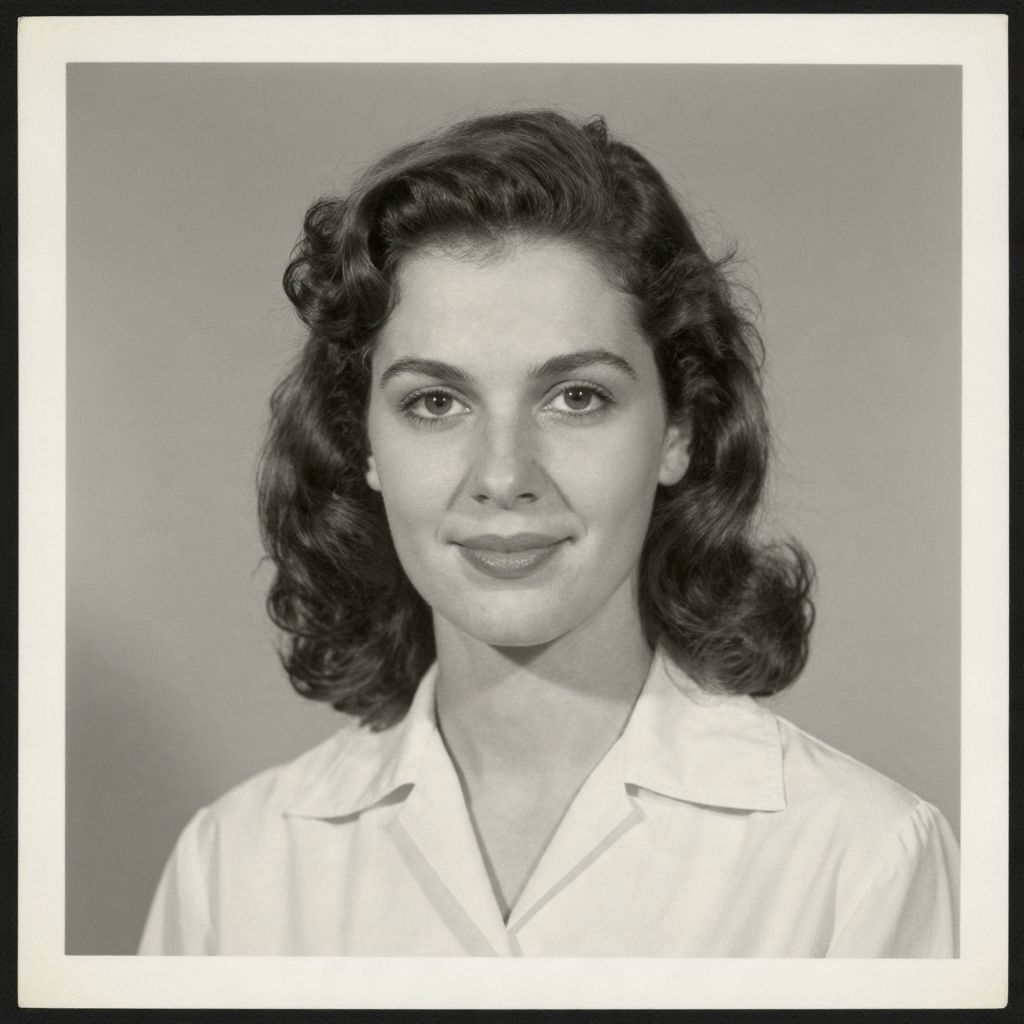
The old print as scanned. We cropped away the white border before adding it to the Image field.
The 6 second message that went into the Audio field.
The clip InfiniteTalk Fast returned.
Look closely at the clip. The video stays black and white, and the face moves and smiles with the words. It is also a little smoother than the print: some of the paper grain is gone. That is the model redrawing the face for every frame.
Other tools that take a photo and an audio file
| Tool | You give it | What we read on its pages on 19 Nov 2026 |
|---|---|---|
| Percify | A photo and an audio file | InfiniteTalk Fast is billed per second of audio. No watermark on the video on any plan. Paid from Starter $12 a month. |
| HeyGen ↗ | A photo avatar made from your photo, then a script or an uploaded audio file | Free plan: 3 videos a month, watermarked, up to 1 minute each, up to 3 photo avatars. Presenter Mode runs up to 30 minutes. Paid from Creator $29 a month. |
| Hedra ↗ | A start frame image and an audio file (Character 3) | Up to 10 minutes, 540p, 720p or 1080p. Its plans page lists no free plan. Paid from Basic $20 a month. |
| D-ID ↗ | A face image (JPEG or PNG, up to 10 MB) | Its studio page lists audio as an input. We did not find wording about uploading your own recording, so check that in its trial before you pay. See its pricing page. |
| SadTalker ↗ (open model) | One portrait image and audio | Apache 2.0 licence. You install and run it on your own computer. No plan, your own hardware. |
| InfiniteTalk ↗ (open model) | An image and audio | Apache 2.0 licence. Its authors warn that colours drift in image to video beyond 1 minute. No plan, your own hardware. |
Each of these tools has its own rules about whose face you may upload. Read them before you use a relative's photo there.
What this does not do
- It does not restore the photo. Scratches, fading and blur stay in the video. Repair the scan first if you want a clean picture.
- It does not recreate a voice from the past. The voice in the video is the audio file you give it.
- It does not film anyone. The video is generated from one still photo and shows movement that never happened in front of a camera.
- It is not for people who cannot agree. See the first section.
Start with a 5 to 10 second message. You see how that photo holds up before you record the long one.
Ready to Create Your Own AI Avatar?
Make a talking video of yourself from one photo, in your own voice. No watermark on any plan.
Cancel anytime from your profile
Got questions?
Frequently asked
Scan or photograph the old print, record the message as an audio file, and give both to a lip sync tool: it renders a short video in which the face in the photo speaks the message. On Percify you add the scanned photo in the Image field and the recording in the Audio field of InfiniteTalk Fast.
This guide is only for a photo of yourself when you were younger, or a photo of a living relative who has agreed to it. Percify's terms do not allow making a talking video of a person without their explicit consent, or impersonating anyone. If the person in the photo cannot agree, or has not, do not make it.
Scan it or photograph it flat, in even daylight, with no glare on the print and no fingers in the frame. Crop to one face, head and shoulders, with the mouth visible and closed or nearly closed. If the face is only a few millimetres wide on the print, the result will be soft.
It does not restore the photo: scratches, fading and blur stay in the video. It does not recreate a voice from the past. The voice in the video is the audio file you give it.
No. The video is generated from one still photo and shows movement that never happened in front of a camera. Tell the family the video was generated from a still photo.