Quick Answer
The best app to animate a photo depends on the kind of animation you want. To make the person in the photo talk in your own voice with no watermark, Percify: a talking photo costs 2 credits a second on the fast engine, plans start at $26 a month, and no plan carries a watermark. HeyGen and D-ID also make talking photos, with watermarks on their free plans, and Hedra's Character 3 animates one image from your audio at 2.5 cents a second. To move the whole scene, use an image to video model such as Runway's Gen-4. To make old family photos smile and blink, MyHeritage's Deep Nostalgia.
What seven photo animation apps really do in 2026 (make a face talk, move the scene, or bring old family photos to life), what their free plans give, and 179 real talking photo renders timed.
Percify talking photo
Make a photo talk, from 2 credits a second
Upload a portrait, add a voice, and get a lip synced talking video. A 10 second video is 20 credits on the fast model, roughly 35 to 50 cents. See real examples and the full price table first.
See how it works →
Keep reading
Related next steps
"Animate a photo" can mean three different jobs, and the app that is best for one is often useless for the other two. This page compares seven tools on what they actually animate, what their free plans give and where the watermark sits, read off each vendor's own pages on 13 and 15 September 2026. Then it uses 179 real talking photo renders on Percify to show what the job costs and why about 9 percent of photos fail whatever tool you use.
We make one of these tools, so every claim about the others comes from their own pages, linked and dated, and every number about ours from our own records.
The seven tools at a glance
| tool | what it animates | free to try | watermark | first paid plan |
|---|---|---|---|---|
| HeyGen ↗ | a talking photo avatar from one photo | 3 videos a month, up to 1 minute each | removal listed from Creator | Creator, $29 a month, with unlimited photo avatars |
| D-ID ↗ | a talking photo, the product it started with | 14 day trial, 3 minutes of video | full screen on the trial; a D-ID or AI watermark through Pro | Lite, $4.70 a month billed yearly, personal use only |
| Hedra ↗ | Character 3: one image plus your audio, talking or singing, up to 10 minutes | free to start | not stated | Basic, $15 a month for 1,500 credits; 2.5 cents a second at 540p |
| Vidnoz ↗ | a talking photo from a photo and text | 30 credits a day, about 60 seconds, up to 3 minutes a video at 720p | Vidnoz watermark on the free plan | Starter, $19.99 a month billed yearly, no watermark |
| MyHeritage Deep Nostalgia ↗ | faces in old family photos: preset smiles, blinks and head turns, no speech | free signup required | its FAQ mentions a motion icon in the bottom left corner | no price stated on the page |
| Runway ↗ | the whole scene moves: image to video with Gen-4.5, Gen-4 Turbo and others | 125 one time credits | "No watermarks" listed from Standard | Standard, $12 a month billed yearly for 625 credits, about 52 seconds of Gen-4.5 |
Only one of the seven has no watermark on any plan, and only five of them make a face speak at all.
Which tool fits which job
- Make the person in a photo talk, in your own voice, for public use: Percify, with no watermark on any plan.
- A few short talking photo tests: HeyGen's free plan, 3 videos a month of up to a minute.
- A talking or singing character from one image and your own audio: Hedra's Character 3.
- A talking photo trial for yourself: D-ID's 14 day trial, for personal use.
- Free talking photos where a watermark is fine: Vidnoz.
- Make an old family photo smile and blink: MyHeritage Deep Nostalgia.
- Make the whole scene move rather than a face talk: Runway, or an image to video model in Percify's model catalogue.
The three things "animate a photo" can mean
Getting this wrong is the most common reason people are disappointed, so it is worth being precise before comparing anything. Which of the three you want also decides the cost, and the credit pricing separates them clearly.
Motion on a still. The camera drifts across the photo, or, with an image to video model, the scene itself moves: hair, water, a slow turn. There is no speech. Runway's Gen-4 models do this, and so do the image to video models in Percify's model catalogue.
Face animation. The face moves: a blink, a smile, a small turn of the head, taken from a preset. There is no speech, so there is nothing to synchronise. MyHeritage's Deep Nostalgia does this for old family photos.
Talking photo. The person speaks your audio, with the mouth matched to it. This is the hard one, the expensive one, and the one people usually mean when they say animate my picture. Percify, HeyGen, D-ID, Hedra and Vidnoz all do this one, and most of this page is about it.
If you only want the first two, almost anything works and you should optimise for price. If you want the third, the differences between tools are real, and the lip sync comparison goes into which approach suits which source.
What it actually costs and how long it takes
Across those 179 renders, grouped by the setting they ran at: The same records back the model catalogue, so any number here traces to the engine that produced it.
| setting | renders | average audio | render seconds per audio second | credits |
|---|---|---|---|---|
| fast, 480p | 107 | 33.1s | 7.62 | 65.9 |
| standard, 480p | 14 | 23.4s | 11.23 | 93.4 |
| standard, 720p | 52 | 25.9s | 25.15 | 155.2 |
Read the middle column as a multiplier on your clip length. A 30 second talking photo finishes in about 3 minutes 49 seconds on the fast setting and about 12 minutes 34 seconds at 720p, for 2.4 times the credits. A later sample of 88 clips, June to September 2026, rendered faster on the fast engine, about 5.2 seconds per second of audio, so read these as the upper end.
That trade is the single biggest decision in this job, and it is not about quality in the way people assume. Higher resolution does not improve the synchronisation at all. It only puts more pixels on the mouth, which matters if the face is small in the frame and is wasted if it is not. You can check what those credits cost before choosing a setting.
Nine percent of photos are the problem, not the tool
Of the 160 unique source photos in that dataset: 145 were used once, 13 were used twice, one was used three times, and one was used five times. The same pattern shows up when replicating a video, where 86 percent of failures happen before generation starts.
Nobody runs the same photo five times because of a model problem. They do it because that particular photo cannot produce a good result, and nothing told them why. About 9 percent of source images get retried, and almost every retry is a source problem being mistaken for a tool problem.
This is the most useful thing in the data and the part no comparison article can give you, because it requires having run the job at volume. Before you judge any tool, check the photo.
What makes a photo work
Five properties decide it, and you can check all of them in under a minute. If your photo fails on face size specifically, a tighter crop is cheaper than paying for 720p.
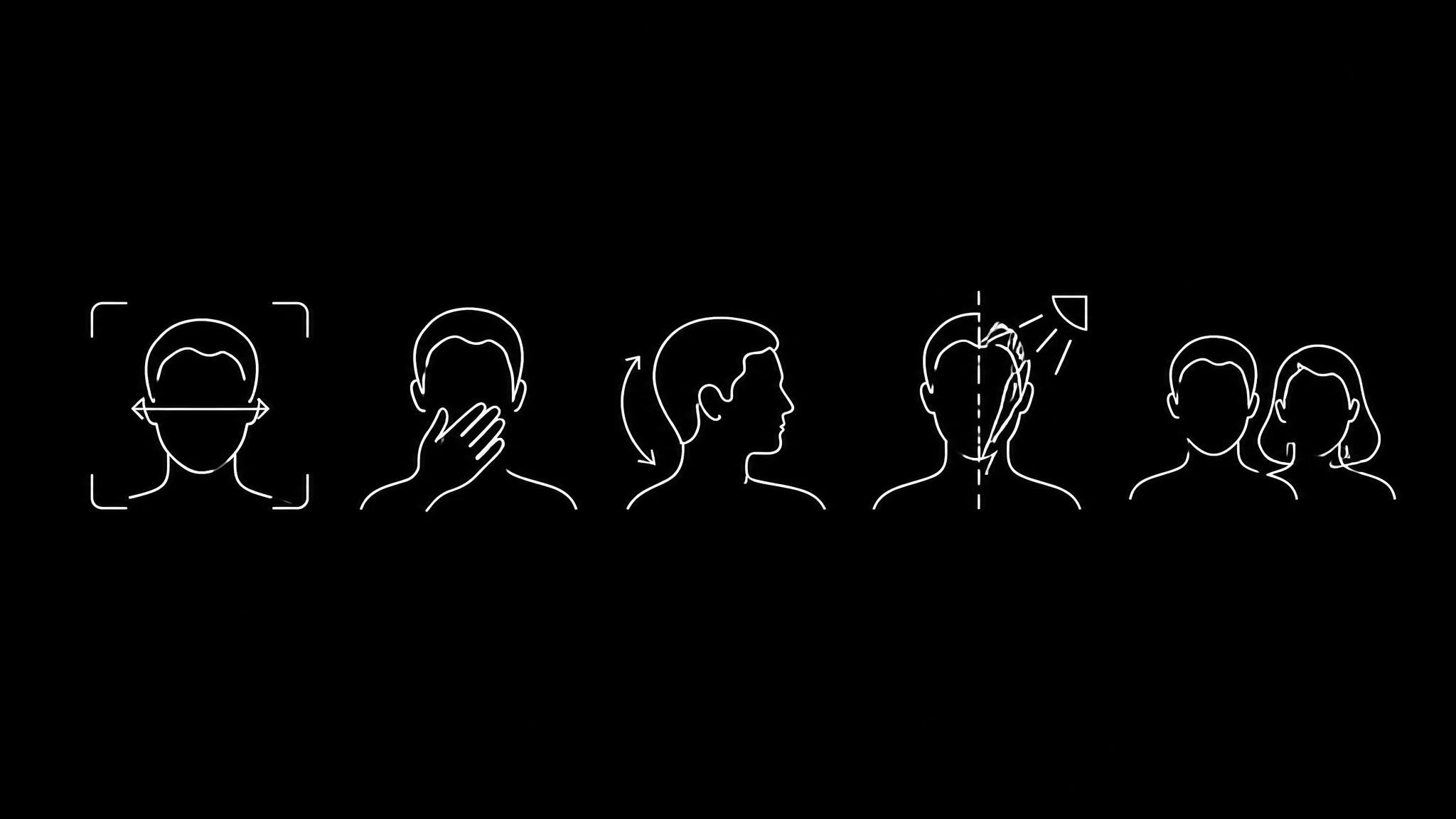
- Face size. The face should be at least a quarter of the frame width. Below that, the model has too few pixels of mouth to reconstruct, and this is when 720p stops being optional.
- Nothing crossing the mouth. A hand, a microphone, hair, a scarf. The model cannot reconstruct what it cannot see, and this is a hard failure rather than a quality reduction.
- Facing roughly forward. Past about three quarters profile, mouth geometry stops being reconstructable.
- Even lighting on the face. Hard shadows across the mouth produce the same problem as something covering it.
- One face only. These models expect a single subject. A second face gives unpredictable results, usually the wrong mouth moving.
A photo failing two of these is not worth retrying. Replace it. This is the same diagnosis path as the lip sync troubleshooting guide, because it is the same underlying model behaviour.
Audio decides more than the photo does
The mouth shapes come from phonemes in your audio. Unclear audio means ambiguous phonemes, and the mouth guesses. Most complaints that sound like video problems start here. Translated audio makes this harder still, which is why dubbing has its own timing rules.
Clean speech with no music under it, a consistent level, and real pauses between sentences. Normalising the track with ffmpeg ↗ costs nothing and removes a whole category of failure. If you are generating the voice as well, some voice tools preserve phoneme detail better than others for exactly this reason.
Tool by tool
Percify
Best for a talking photo of a real person, in their own voice, that can go public. One photo and a script or audio make a talking video, and a short voice sample clones the voice. A talking photo costs 2 credits a second on the fast engine at 480p; 720p takes about three times as long per second of audio. Paid plans are Creator at $26 a month for 1,233 credits, Scale at $65 for 3,000 and Ultra at $128 for 8,000. No plan carries a watermark, and every plan includes commercial rights. The catch: the fast engine renders at 480p.
HeyGen
Best for a polished talking photo avatar that you can also restyle with prompts and Look Packs, per its talking photo page ↗. The free plan ↗ makes 3 videos a month of up to a minute; Creator, at $29 a month, adds unlimited photo avatars and watermark removal. The catch: free videos stop at a minute.
D-ID
The company that built the talking photo, and the technology MyHeritage licenses for Deep Nostalgia. Its trial ↗ gives 3 minutes of video over 14 days, with a full screen watermark, for personal use. Lite is $4.70 a month billed yearly and still watermarked; the commercial licence starts on Pro at $16. The catch: a watermark stays on every plan below Advanced.
Hedra
Best for expressive talking or singing characters from one image and your own audio. Character 3 ↗ makes clips of up to 10 minutes at 2.5 cents a second at 540p, 5 cents at 720p and 6.25 cents at 1080p, and every paid plan ↗ from $15 a month includes commercial use. The catch: it is priced per second, so work out what your clip length costs first.
Vidnoz
Best for free talking photos where a watermark is acceptable. The free plan ↗ gives 30 credits a day, about 60 seconds of video, with videos up to 3 minutes at 720p and the Vidnoz watermark; Starter, $19.99 a month billed yearly, removes it. The catch: the watermark stays on free videos even under their commercial licence.
MyHeritage Deep Nostalgia
Best for old family photos. It animates the faces ↗ with preset movements, a smile, a blink, a turn of the head, using technology licensed from D-ID, and MyHeritage counts over 119 million animations. It does not make anyone speak. The catch: a free signup is required, and its FAQ mentions a motion icon in the corner of each animation.
Runway
Best when the whole scene should move rather than a face talk. The free plan ↗ gives 125 one time credits; Standard, $12 a month billed yearly, gives 625 credits a month and lists no watermarks. The catch: credits go quickly on the newest model, since 625 buy about 52 seconds of Gen-4.5.
What the free plans give, and what they hold back
On the day we checked, only Percify had no watermark on any plan. HeyGen's free plan makes 3 videos a month of up to a minute. D-ID's trial is 14 days and 3 minutes, with a full screen watermark and a personal use licence. Vidnoz gives about 60 seconds a day at 720p with its watermark. Runway gives 125 one time credits, and Hedra and MyHeritage are free to start. That decides whether a result is usable more often than quality does, so check it before you invest time in a tool. Rights follow the output rather than the tool, so voice cloning and copyright is worth reading if the voice is not yours.
If you are only testing whether your photo works at all, watermarked output is fine, and several free options are good enough for that. If the video is going anywhere public, confirm the licence first, and what you may publish covers consent and disclosure, which are separate questions from licensing.
What none of these do well
Singing. Sustained vowels and held notes sit outside what these models were trained on. Results are poor across every engine we have run.
Long clips from one photo. A still has one pose. Past roughly a minute, the absence of real body movement becomes obvious no matter how good the mouth is.
Strong accents against a mismatched language track. Phoneme sets differ by language and the model resolves toward what it knows, which is also why dubbing is its own pipeline rather than a setting.
Profile shots. Covered above, but it is the most common source failure so it is worth repeating.
Doing it, in order
Pick a photo that passes the five checks. Record or generate clean audio with real pauses. Run it on the fast setting first, because it costs a third of the time and 720p will not fix anything the source got wrong. Look at the mouth specifically rather than the overall impression. If it is wrong, change the photo before changing any setting, and only move to 720p when the face is genuinely small in frame. Where a limit is an engine limit rather than a product limit, no competitor claiming otherwise should be believed without a test, and the lip sync comparison covers which ones state theirs. If the result is going on social, the platform publishing rules decide how it must be labelled.
The whole loop costs about 66 credits on the fast setting for a half minute clip. You can try it ↗ before deciding, and the model list records which engine produced any given result so you can attribute it honestly. If you would rather work from a format that already performs, the flows are pinned pipelines built around specific shortform structures, and remaking a video shot for shot is the version of this job that starts from a reference rather than a photo.
Ready to Create Your Own AI Avatar?
Make a talking video of yourself from one photo, in your own voice. No watermark on any plan.
Cancel anytime, no contracts
Got questions?
Frequently asked
It depends on the job. To make the person talk in your own voice with no watermark, Percify. For a few short talking photo tests, HeyGen's free plan. For a talking or singing character from one image and your audio, Hedra's Character 3. To move the whole scene, Runway or another image to video model. To make an old family photo smile and blink, MyHeritage Deep Nostalgia.
On their own pages in September 2026: HeyGen's free plan makes 3 talking photo videos a month of up to a minute; Vidnoz gives about 60 seconds a day at 720p with its watermark; D-ID offers a 14 day trial of 3 minutes with a full screen watermark, for personal use; Runway gives 125 one time credits for image to video; MyHeritage Deep Nostalgia needs a free signup. Percify is free to start and puts no watermark on any plan.
You can try it free on several tools, with limits. HeyGen allows 3 videos a month of up to a minute, Vidnoz about 60 seconds a day with a watermark, and D-ID a 14 day trial for personal use. Percify is free to start without a card and puts no watermark on any plan; a talking photo uses credits, 2 a second on the fast engine, with plans from $26 a month.
Across 179 renders on Percify, about 7.62 render seconds per second of audio on the fast 480p setting and about 25.15 at 720p, so a 30 second talking photo took roughly 3 minutes 49 seconds on fast and about 12 minutes 34 seconds at 720p. A later sample of 88 clips rendered faster on the fast engine, about 5.2 seconds per second of audio.
A talking photo keeps the photo still except for the face and matches the mouth to your audio. Image to video moves the whole scene, like hair, water or the camera, and usually has no speech. Runway's Gen-4 models and the image to video models in Percify's catalogue do the second; Percify, HeyGen, D-ID, Hedra and Vidnoz do the first.
It animates the faces in family photos with preset movements, such as a smile, a blink and a turn of the head, using technology MyHeritage licensed from D-ID. It does not make anyone speak, and a free signup is required, per its own page in September 2026.
Because the photo is usually the problem. In our records 9 percent of source images were run more than once, and one was run five times. Check that the face is at least a quarter of the frame width, that nothing crosses the mouth, that the subject faces roughly forward and that the lighting is even.
Not well on the engines we run: sustained vowels and held notes are outside what they were trained on. Hedra says its Character 3 model makes talking and singing video, so try it there if singing is the job.

